
Key Takeaways
- While cloud concepts are transferable, hands-on experience with at least one of the “big three” providers is crucial for effective cloud management.
- Linux is the dominant operating system in the cloud, running on approximately 90% of public cloud workloads.
- Soft skills like communication and business acumen separate good technicians from great leaders.
Cloud adoption isn’t slowing down. Global spending on public cloud services was estimated at $679 billion in 2024, representing a 20.4% increase from 2023. Organizations across industries are racing to migrate workloads, optimize costs, and improve security. This surge has created massive demand for skilled cloud professionals who can manage these complex environments.
Cloud management is the process of overseeing all aspects of a company’s cloud infrastructure, ensuring security, managing costs, and optimizing performance across platforms. Beyond keeping systems running, it’s about making strategic decisions that directly impact a business’s ability to scale, innovate, and compete.
This article breaks down the essential technical skills and critical soft skills you’ll need to succeed in a cloud management role, and how you can start building them today.
Essential Cloud Management Skills
These are the foundational, hands-on technical competencies that every cloud professional must develop. Mastering essential cloud management skills ensures you can design, deploy, and maintain cloud environments that meet both business and security requirements.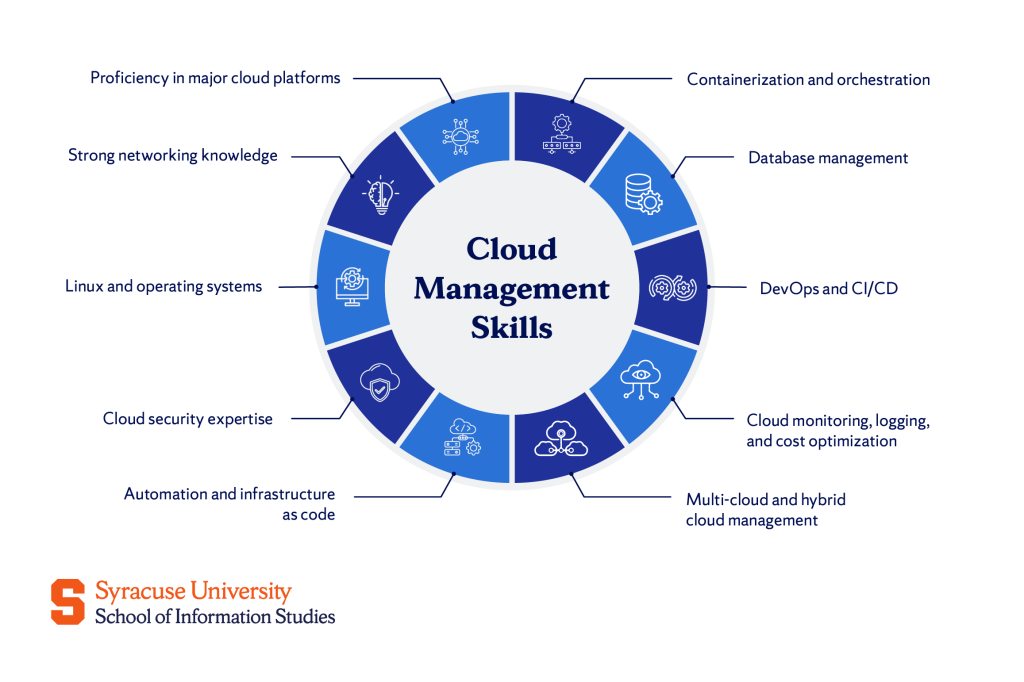
Proficiency in major cloud platforms
While cloud concepts are transferable, hands-on experience with at least one of the “big three” providers is crucial. Employers expect you to navigate these platforms confidently and understand their core services.
- AWS (Amazon Web Services): The market leader, AWS holds approximately 31% of the global cloud market share and offers over 200 services. Core skills include working with EC2 (virtual servers) and S3 (object storage). You’ll use EC2 to launch and manage compute instances, while S3 handles scalable storage for everything from backups to static websites.
- Azure (Microsoft): Azure integrates seamlessly with Microsoft products, making it a top choice for enterprises. With approximately 25% market share, Azure is the second-largest cloud provider. Learn to deploy Virtual Machines and manage Blob Storage for unstructured data. Azure’s strong identity management tools (Azure Active Directory) are also critical.
- GCP (Google Cloud Platform): Known for data analytics and machine learning, GCP holds about 11% of the market. GCP uses Compute Engine for virtual machines and Cloud Storage for scalable object storage. GCP’s BigQuery and AI tools give it an edge in data-heavy workloads.
Start with one platform, get certified, and expand from there. Employers value depth in one platform over surface-level knowledge across all three.
Strong networking knowledge
Networking is the backbone of cloud infrastructure. In the cloud, networking is software-defined, meaning you configure virtual networks, subnets, and security rules through code or dashboards instead of physical hardware.
A Virtual Private Cloud (VPC) serves as your isolated network, giving you control over IP ranges, subnets, and secure connections between resources. VPCs are fundamental for security and isolation, often used to separate production from development.
Load balancers play a key role in distributing traffic across multiple servers, ensuring no single instance gets overwhelmed. They improve both reliability and performance, automatically rerouting traffic if a server fails.
Understanding how data flows between cloud resources, on-premises systems, and the internet is critical. You’ll need to troubleshoot connectivity issues, configure firewalls, and optimize network performance.
Linux and operating systems
Linux is the dominant operating system in the cloud. According to the Linux Foundation, Linux runs on approximately 90% of public cloud workloads. Its popularity comes from being lightweight, stable, and open-source, making it the default choice for most virtual machines.
To work effectively, you’ll need command-line proficiency, since much of your time will be spent in the terminal managing servers, troubleshooting issues, and automating tasks with commands like ssh, top, grep, and chmod.
Bash scripting adds another layer of efficiency, allowing you to automate repetitive jobs such as launching servers, backing up files, or monitoring system health; hence reducing both time and error.
While Windows Server knowledge is valuable for certain environments, Linux skills are universally applicable. If you’re new to Linux, start with Ubuntu or CentOS and practice in a virtual lab environment.
Cloud security expertise
Security is a core responsibility in the cloud. IBM’s Cost of a Data Breach Report 2025 puts the average breach at $4.4 million, showing why protecting data, systems, and users is critical.
As a cloud professional, you’ll work with identity and access management (IAM) to control who can do what, creating accounts, setting permissions, and enforcing safeguards like multi-factor authentication while applying the principle of least privilege.
You’ll also manage data encryption, ensuring information is secure both at rest and in transit, and you’ll align your environment with compliance frameworks such as GDPR, HIPAA, or SOC 2, depending on your industry.
Ultimately, security is a shared responsibility: cloud providers secure the infrastructure, but it’s up to you to safeguard applications, data, and access controls.
Automation and infrastructure as code
Infrastructure as Code (IaC) is the practice of managing infrastructure using configuration files instead of manual processes. It brings automation, consistency, and version control to cloud environments.
Terraform is the leading IaC tool. According to HashiCorp’s State of Cloud Strategy Survey, 76% of organizations use infrastructure as code practices. You write configuration files (in HashiCorp Configuration Language) that define your infrastructure (servers, networks, databases), and Terraform automatically provisions them while keeping changes tracked, repeatable, and easy to audit.
Alongside this, scripting languages like Python and Bash are central to automation: Python for tasks such as managing AWS resources with boto3 or processing data, and Bash for simpler routines like file management or monitoring.
Automation reduces human error, speeds up deployments, and makes it easier to scale infrastructure. Instead of manually clicking through dashboards, you define your environment once and deploy it anywhere.
Containerization and orchestration
Containers have transformed how applications are built and deployed by making them lightweight, portable, and consistent across environments.
Docker enables this by packaging an application and its dependencies into a self-contained unit that runs the same way on any system, offering more speed and efficiency than virtual machines since containers share the host operating system.
At scale, Kubernetes takes over, automating deployment, scaling, and management while monitoring container health, restarting failed units, and balancing workloads across servers. It has become the industry standard for container orchestration, with more than 90% of organizations already using or evaluating it.
Containerization is essential for modern, microservices-based applications. If you’re managing cloud infrastructure, you’ll work with Docker and Kubernetes regularly.
Database management
Data is at the heart of every application, and managing it efficiently is a core cloud skill. Relational databases such as Amazon RDS and Azure SQL Database store structured data in tables with defined relationships, where you’ll design schemas, write queries, and fine-tune performance.
For unstructured or semi-structured data like JSON documents or key-value pairs, NoSQL databases such as DynamoDB and Cosmos DB offer the flexibility and horizontal scalability needed for high-volume, distributed applications.
Cloud providers deliver both relational and NoSQL options as managed services, taking care of backups, updates, and scaling so you can focus on how data is modeled, accessed, and used.
DevOps and CI/CD
DevOps is a culture that brings development and operations teams together, breaking down silos and accelerating delivery.
A key practice is CI/CD, which automates the cycle of building, testing, and deploying code so that when developers commit changes to a repository like Git, the pipeline builds the application, runs tests, and pushes it to production if everything passes.
Tools such as Jenkins, GitLab CI, and GitHub Actions support this process, allowing teams to configure pipelines, troubleshoot build failures, and streamline deployments.
By adopting these practices, organizations gain speed, quality, and stronger collaboration, moving from release cycles that once took weeks to updates that can roll out several times a day.
Cloud monitoring, logging, and cost optimization
Managing cloud infrastructure requires continuous attention to performance, reliability, and cost. Monitoring tools such as AWS CloudWatch, Azure Monitor, and Google Cloud Operations track metrics like CPU usage, memory, and network traffic, with alerts set up to flag potential issues before they cause downtime.
Logs provide detailed records of requests, errors, and transactions, and centralized systems like the ELK Stack or Splunk bring this data together to make troubleshooting more efficient.
Just as important is cost optimization, often called FinOps, since cloud expenses can escalate quickly; industry reports estimate that nearly 28% of cloud spend is wasted.
Multi-cloud and hybrid cloud management
Many companies use more than one cloud provider (multi-cloud) or combine on-premises infrastructure with cloud services (hybrid cloud).
Multi-cloud strategies are common (87% of enterprises use them) to avoid vendor lock-in, increase redundancy, or tap into unique features such as AWS for compute and Azure for AI.
Hybrid models remain important too, since some workloads must stay on-premises for reasons like compliance, latency, or legacy systems, while still connecting seamlessly to the cloud.
Managing this complexity requires advanced skills in configuring secure connections, applying consistent security policies, and orchestrating workloads across platforms, with tools such as VMware Cloud and Azure Arc helping to reduce complexity.
Critical Soft Skills for Cloud Professionals
Technical knowledge opens the door, but soft skills shape your success. Cloud professionals work in cross-functional teams, translate complex ideas for non-technical stakeholders, and solve problems under pressure. These skills separate good technicians from great leaders.
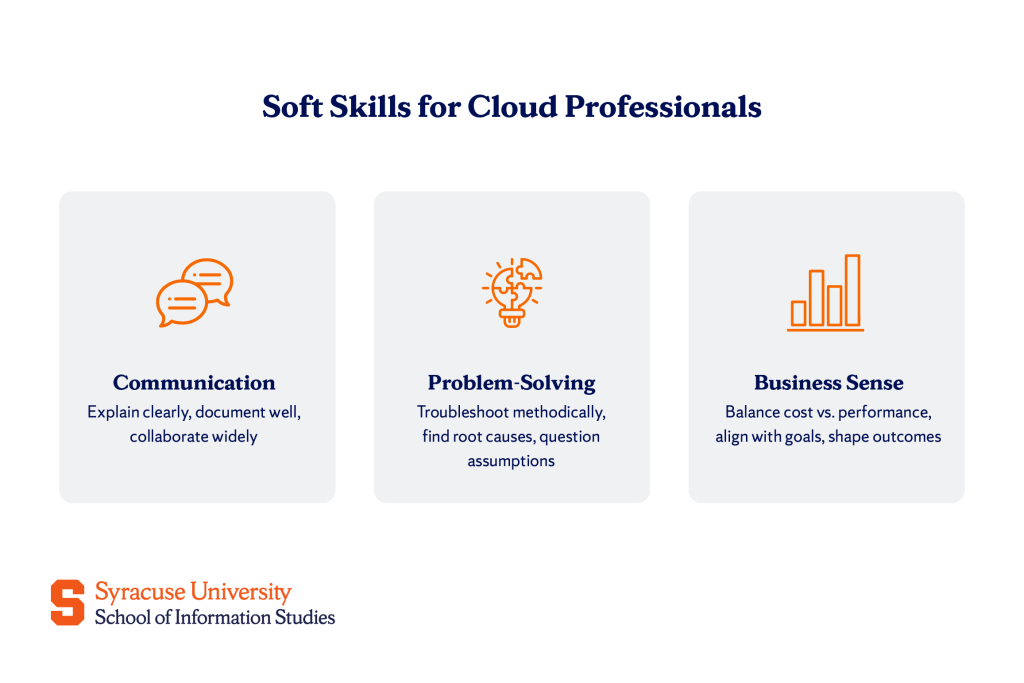
Communication and collaboration
As a cloud professional, you’ll spend as much time explaining technical decisions as implementing them, whether that means justifying a migration to executives, writing documentation for your team, or troubleshooting with a vendor.
Clear communication is essential, and translating technical concepts into plain language helps others focus on outcomes and business value; finance teams care about cost savings, while project managers want timelines, not API calls.
Strong documentation, from runbooks and incident reports to architecture diagrams, prevents confusion and saves time for both you and your colleagues.
Collaboration is equally critical, since you’re part of a larger ecosystem of developers, designers, security specialists, and business stakeholders, and your ability to listen, adapt, and communicate directly shapes project success.
Problem-solving and critical thinking
Cloud environments are complex and distributed, and when something goes wrong, you need to approach it like a detective: collecting evidence, forming hypotheses, and testing solutions until you find the cause.
Troubleshooting usually begins with logs and metrics, asking what has changed, whether the issue is confined to a specific region or service, and if it can be reproduced.
The goal is not just to patch symptoms but to uncover root causes, whether that’s a configuration change or a resource limit, so similar incidents don’t resurface.
Critical thinking also means questioning assumptions. Just because a process worked in the past doesn’t mean it’s still the best approach. Staying curious and questioning established processes helps ensure your approach remains effective.
Business acumen
Technical skills are essential, but what sets you apart is understanding the “why” behind your work and how it connects to business goals. Strong business acumen means weighing cost versus performance trade-offs, such as deciding whether to use a larger instance for speed or optimize code to run on smaller, cheaper ones.
It also means aligning cloud architecture with broader priorities; supporting a new product launch with the right infrastructure or reducing expenses without undermining reliability.
Cloud professionals who think this way move beyond execution to influence outcomes, becoming trusted advisors who shape strategy as well as systems.
The Bottom Line
Success in cloud management requires more than technical expertise. It demands mastery of cloud platforms, networking, security, and automation, along with strong communication, problem-solving, and the ability to align your work with business goals.
You can begin building these skills today by taking online courses, pursuing certifications such as AWS Certified Solutions Architect or Google Cloud Professional, and experimenting with personal projects. From launching your first EC2 instance to designing a multi-cloud architecture, every step adds valuable experience and moves you closer to a rewarding career in cloud management.
Explore the Certificate of Advanced Study (CAS) in Cloud Management at Syracuse University’s iSchool—a program designed to give you the hands-on skills and industry connections you need to succeed.
Frequently Asked Questions (FAQs)
What are the three main skills of cloud computing?
The three main skills are cloud platform proficiency (AWS, Azure, or GCP), security and compliance management (IAM, encryption, regulatory frameworks), and automation and Infrastructure as Code (Terraform, scripting). These form the foundation for managing scalable, secure, and efficient cloud environments.
How can I start learning cloud management skills?
Start with free-tier accounts on AWS, Azure, or GCP to practice hands-on. Take beginner courses on platforms like Coursera, Udemy, or A Cloud Guru. Earn foundational certifications like AWS Certified Cloud Practitioner or Microsoft Azure Fundamentals. Build personal projects (deploy a website, set up a database, or automate a task) to reinforce what you learn.
Is coding required for cloud management?
Yes, but you don’t need to be a software developer. You’ll use scripting languages like Python and Bash to automate tasks, and you’ll work with Infrastructure as Code tools like Terraform. Basic programming skills make you more effective, but cloud management focuses more on configuration, architecture, and operations than full-stack development.
Which cloud certification is best for beginners?
For AWS, start with the AWS Certified Cloud Practitioner. For Azure, try the Microsoft Azure Fundamentals (AZ-900). For GCP, the Google Cloud Digital Leader is a good entry point. Choose based on the platform most relevant to your career goals.